For NYC architects and expediters

Prepare DOB filings and track every building, in one firm workspace.

BoroughDesk watches your buildings across DOB NOW, BIS, ECB/OATH and HPD by BIN or address, and prepares the filing package from NYC Open Data. A person on your team always reviews it and submits in DOB NOW. BoroughDesk never submits anything itself.

  • Prepares packages, never auto-submits
  • Sign and submit steps follow DOB roles
  • Firm seats with shared portfolios
BoroughDesk / Portfolio monitor Sample data
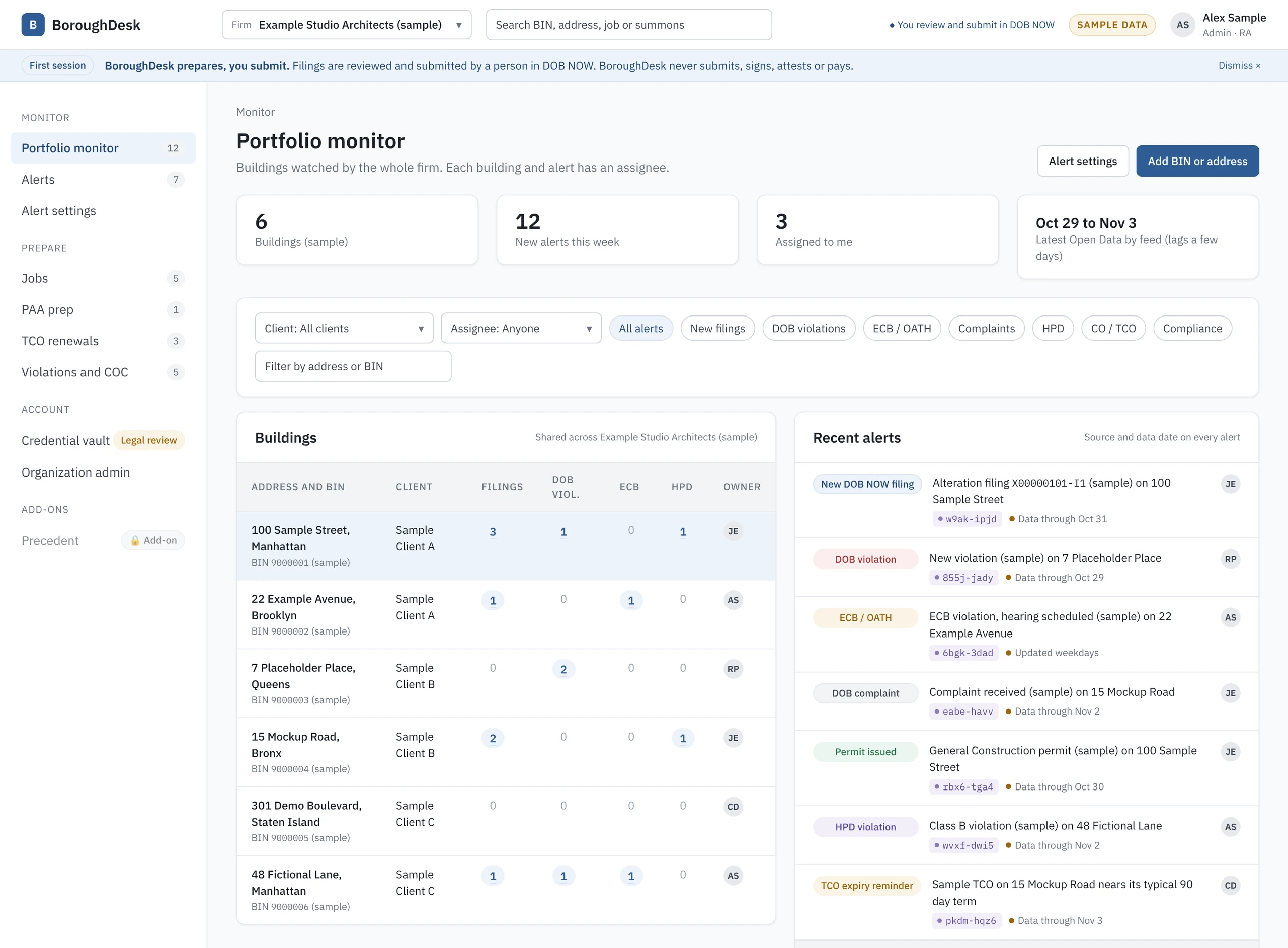
BoroughDesk portfolio monitor showing six sample buildings with filing, violation and HPD counts, and a recent alerts feed where each alert names its NYC Open Data source and data date.
Tracks records from
  • DOB NOW
  • BIS
  • ECB / OATH
  • HPD
  • PLUTO
  • NYC Open Data
Read-only feeds. Open Data lags agency systems by a few days, so every alert shows its data date.

What it does

One workspace for the buildings you file on.

Architects filing as Applicant of Record and expediters filing as Filing Representatives work in the same jobs. BoroughDesk keeps the building record current, drafts the package, and routes each step to the right person.

01Monitor

Track buildings by BIN or address

Each client keeps its own BIN list and alert settings. Alerts are assigned to a person.

  • New DOB NOW filings and permits issued
  • DOB and ECB violations, DOB complaints
  • HPD violations, complaints and vacate orders
  • CO and TCO issued, with TCO expiry reminders
  • Facade, boiler and elevator compliance
02Prepare

Draft the filing package

Location, zoning and the BIN's job history prefill from PLUTO and DOB Open Data, and every prefilled field names its source.

  • PW1 for Alteration, Alteration CO and New Building, with Zoning Information
  • Plumbing, sprinkler and standpipe scope, PW2 permit data
  • PAA change packages
  • TCO renewal and CO request packages, with the CO Worksheet
  • Certificate of Correction review requests

Also drafts records requests, FOILs, appointment requests, forms and recons.

03Flag

See blockers before you file

BoroughDesk checks the lot against Open Data and asks the questions no dataset answers, so outside approvals surface early.

  • LPC approval for landmarks and historic districts
  • E-designation routed to OER, flood zone flags
  • Parks tree work near a City tree
  • CONH, asbestos and DEP sewer connection
  • Open DOB, ECB and HPD violations on the BIN
04Assign

Seats and roles that follow DOB rules

A firm account holds multiple seats. Each seat is one person with their own login. Portfolios and jobs are shared across the firm.

  • DOB role on each seat: Applicant of Record (RA or PE), Filing Representative, Delegated Associate
  • Sign, attest and submit steps go only to a seat with the matching role
  • Per-person assignees on every job, step and alert
  • Admins invite and remove seats. Removal revokes access immediately.
BoroughDesk / Jobs / PW1 draft Sample data
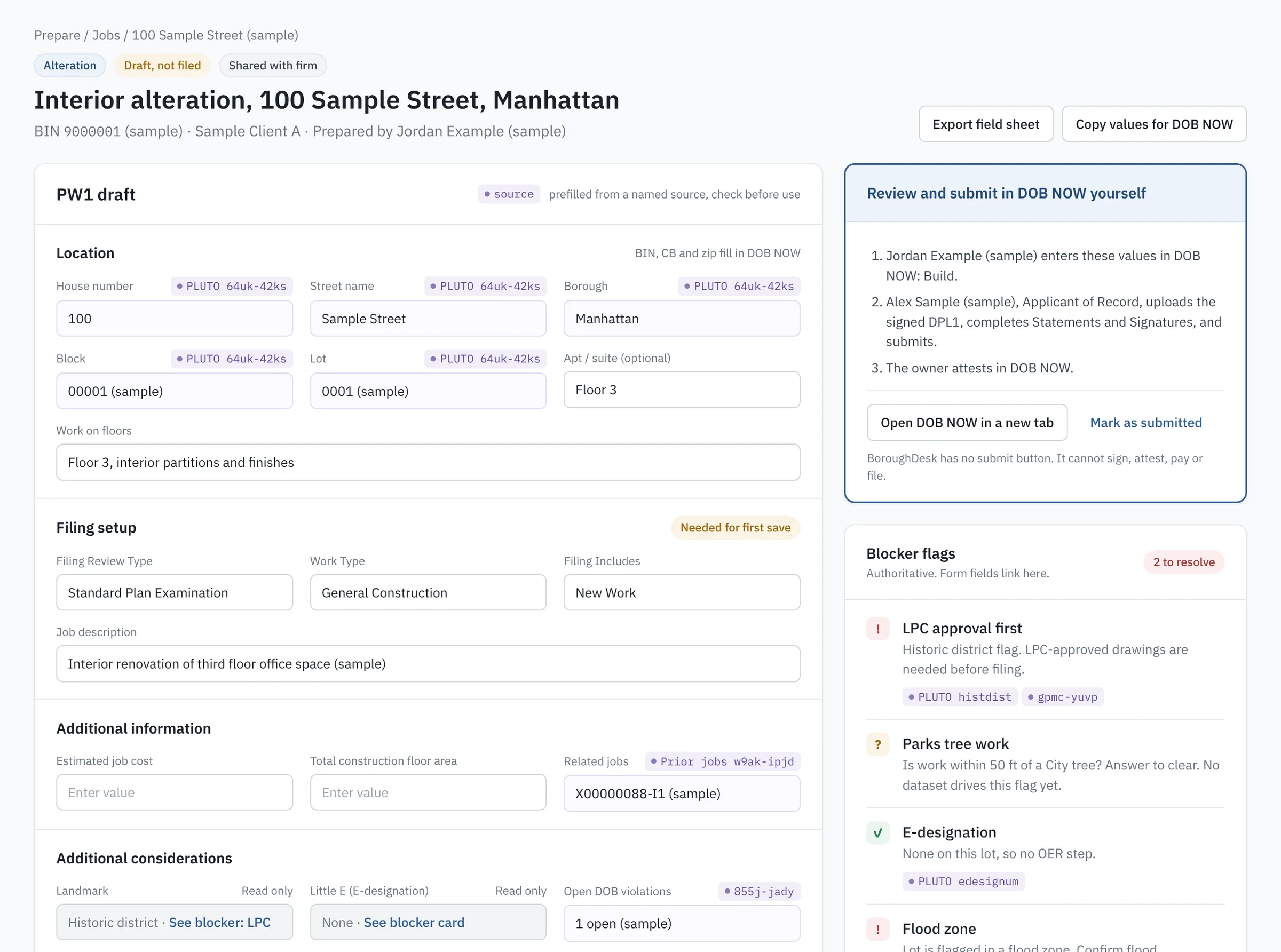
A sample PW1 draft for an interior alteration. Fields are prefilled with PLUTO source tags, a side panel lists the DOB NOW steps for the Filing Representative, Applicant of Record and owner, and blocker flags show LPC, Parks tree work, E-designation and flood zone.

Inside a job

A PW1 draft you can check line by line.

  1. Sourced prefill. Each prefilled field carries a tag for its dataset, such as PLUTO 64uk-42ks, so you know what to verify.
  2. Blockers beside the form. LPC, Parks, E-designation and flood flags link to the fields they affect.
  3. Roles from firm seats. Applicant of Record, Filing Rep and Delegated Associates come from the people on your account.
  4. Handoff, not submission. Copy values for DOB NOW or export a field sheet. The submit step stays with the Applicant of Record.

How it fits DOB NOW and eFiling

BoroughDesk prepares. The permitted person files.

DOB NOW has no public filing API, and BoroughDesk does not log in to it for you. It gets the package ready, then hands it to the person DOB allows to sign, attest and submit.

In BoroughDesk
In DOB NOW or eFiling
1

Start from the BIN or address

Location, zoning, and prior jobs, permits and violations prefill from NYC Open Data.

2

Prepare the package

Anyone on the team drafts fields, change text and the required items list. Blockers are flagged as you go.

3

Assign who signs and submits

Sign, attest and submit tasks can only go to a seat with the matching DOB role.

4

Review, sign and submit

The permitted person enters the values in DOB NOW or eFiling, signs, attests, pays and submits, then marks the job submitted.

Common flows

What each side does
FlowBoroughDesk preparesA person in DOB NOW
Alteration and New Building PW1 fields, Zoning Information, and the required items list (TPP1, ST1, PD1, DPL-1 as triggered) Filing Rep or AoR enters the data. The AoR uploads the signed DPL1, signs and submits. The owner attests.
Plumbing and sprinkler PL, SP and SD scope data, with gas, DEP sewer and FDNY review flags The AoR submits.
PAA Approved data carried over, fields a PAA cannot change marked, change text for PW1 Comments The same AoR as the original filing files and pays.
TCO renewal Expiry reminders, renewal type, CO Worksheet when required, open sign-off check Submits the CO request and pays.
Violation and COC Open violations on the BIN, COC review request with proof documents, Submitter, Certifier and Corrector assigned The Submitter files in DOB NOW: Safety. The owner or respondent attests if they are not the submitter.
Portfolio monitor Alerts by BIN with source and data date Nothing to file. Check the agency portal before acting.

Pricing

Per seat, per month.

One seat is one person with their own login. Tiers are sized to the work that person does.

Proposed pricing

These prices are a proposal we are validating with early customers. They are not live billed prices and may change before launch.

Monitor

For office staff and owners watching BINs. Alerts only.

$49per seat / month

Included

  • Portfolio monitor by BIN or address
  • Alert feed with source and data date
  • Job status on phone
  • Read-only job packages

Not included

  • Drafting
  • Objection Response and Plan Review
  • Precedent
Request early access

Prepare Plus

For heavy preparers who need AI help beyond drafting.

$199per seat / month

Everything in Prepare, plus

  • Higher AI draft allowance
  • Limited Objection Response and Plan Review assist quota

Not included

  • Unlimited Objection Response or Plan Review
  • Precedent (paid add-on)
Request early access
Add-on

Precedent is a paid add-on module on the roadmap. It surfaces cited DOB CCD1 and ZRD1 determinations and BSA rulings that are pertinent to the job you are working on. Priced separately.

Early access

Request early access.

BoroughDesk is in development at Wapniak Labs. Tell us about your firm and how you file, and we will follow up about early access.

Opens your email app with a message to adam@wapniaklabs.com. Nothing is sent until you send it.